
What Is Google Ads for Therapists?
Google Ads lets your practice appear in the sponsored results when people search for the therapy you offer, such as “anxiety therapist near me”. You choose the searches, write the ads and set a budget. You pay when someone clicks.
A few unsuitable clicks can use up a small budget. Ahrefs estimated the cost per click for “therapist near me” at $8.00 in the US when we checked on October 27, 2026. Without careful setup, that money can go on clicks from people looking for therapy jobs, free services or a city you don’t serve. This guide walks through a setup that avoids those mistakes.
How Do You Set Up Google Ads for a Therapy Practice?
Check Google’s rules for your services and set a test budget. Build one Search campaign grouped by service, with focused keywords, negative keywords and ads that match your landing pages. Then track real inquiries, not just clicks, and review your search terms regularly.
Google Ads for therapists in three steps and nine tasks
- Step 1: Plan before you spend
- Check Google’s rules: you know what your services allow before you build anything.
- Set a test budget: you know what you can spend and what a click may cost.
- Prepare your landing pages: each ad leads to a page that answers the searcher’s question.
- Step 2: Build the campaign
- Structure and settings: one Search campaign, grouped by service, targeting the areas you serve.
- Keywords and match types: your ads show for searches that fit your services.
- Negative keywords: you stop paying for searches that can’t become clients.
- Your ads: clear, accurate ads with your phone number and key pages.
- Step 3: Measure and improve
- Conversion tracking: you count inquiries, without sending client details to Google.
- Regular reviews: you cut wasted spend and keep what works.
Step 1: Plan Before You Spend
Before you spend, check your services, budget and landing pages.
1. Check Google’s Rules for Your Services
Google’s rules depend on what you offer:
- Ordinary counseling and therapy: we found no special healthcare certification in Google’s policies for counseling that doesn’t involve prescribing.
- Addiction recovery services: US ads for drug and alcohol recovery services need LegitScript and Google certification. Our drug rehab advertising guide explains it.
- Prescribing services: online prescribing, dispensing or selling prescription drugs has separate certification rules.
Two more rules apply to all mental health ads:
- No remarketing or client lists. For ads about mental health counseling, Google doesn’t allow advertiser-curated audiences, such as Customer Match lists or retargeting people who visited your site.
- No shaming or fear. Google’s “imposing negativity” policy covers ads that shame people or suggest something bad will happen if they don’t act. Describe your service plainly instead.
Read Google’s healthcare policy for your exact services before you open an account.
2. Set a Test Budget
Clicks for therapy searches vary a lot. These are Ahrefs’ US cost-per-click estimates from October 27, 2026:
| Search | US searches a month | Estimated cost per click | Good fit? |
|---|---|---|---|
| therapist near me | 217,000 | $8.00 | Yes, if limited to where you work |
| couples therapy near me | 35,000 | $6.00 | Yes, if you offer couples therapy |
| trauma therapist near me | 4,300 | $4.50 | Yes, if you offer trauma therapy |
| anxiety therapist near me | 9,100 | $2.50 | Yes, if you treat anxiety |
| online therapy | 122,000 | $12.00 | Only if narrowed to the states you serve |
| therapy jobs | 500 | $1.30 | No: people looking for work |
| what is cbt | 17,000 | $0.15 | No: people looking for information |
These are estimates, not prices. Your real cost depends on your city, your competitors and your ads.
How Google’s budget works. You set an average daily budget. For most campaigns, Google can spend up to twice that on a busy day, but your monthly charge is capped at about 30.4 times the daily budget. So a $20 daily budget can cost up to $40 on one day, and no more than $608 in a full month if you don’t change it.
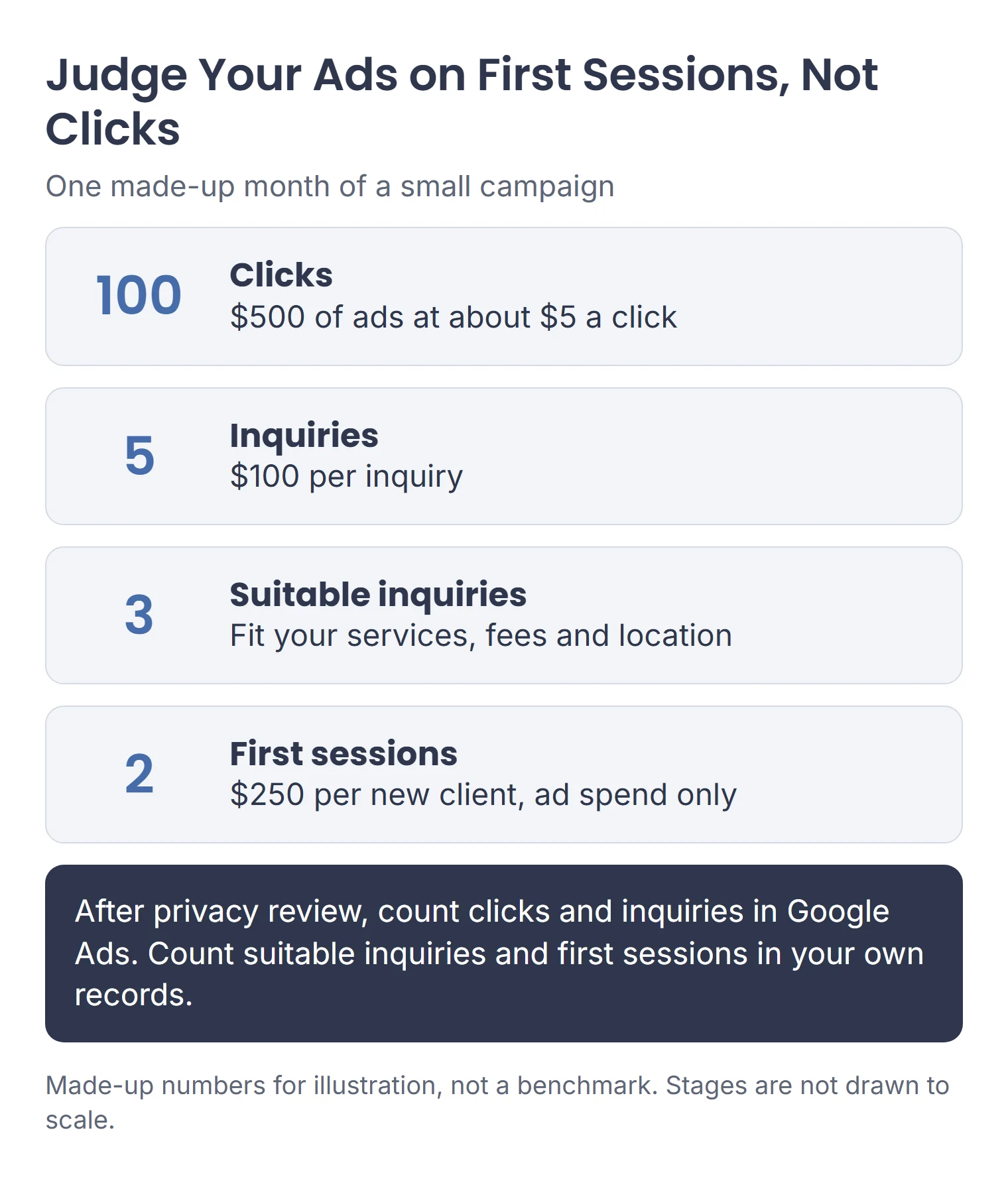
A made-up example. $500 of ads at $5 a click buys 100 clicks. If 5 of those people inquire, that’s $100 per inquiry. If 2 become clients, that’s $250 per client, before your time and any agency fees. Your numbers will differ. Before you set a budget, decide what you can afford to pay for a new client, allowing for cancellations, your time and the margin you need.
Start with an amount you can spend for at least a few months without strain, and plan to judge it on inquiries, not clicks.
3. Prepare Your Landing Pages
A landing page is the page someone sees after clicking your ad. Send each ad to the page that matches it: anxiety ads to your anxiety therapy page, not your homepage. Each page should show:
- Who you help with this concern, and how.
- Your credentials and a photo.
- Your fees and insurance, stated exactly.
- Your location, or the states where you offer telehealth.
- One clear way to call or book.
If you don’t have clear service pages yet, build them first. Our guide to SEO for therapists shows how, and the same pages help your ads.
Check each landing page on your phone before you launch.
Step 2: Build the Campaign
This setup uses one standard Search campaign. Your Google Ads screens may look slightly different from our illustrations.
4. Structure and Settings
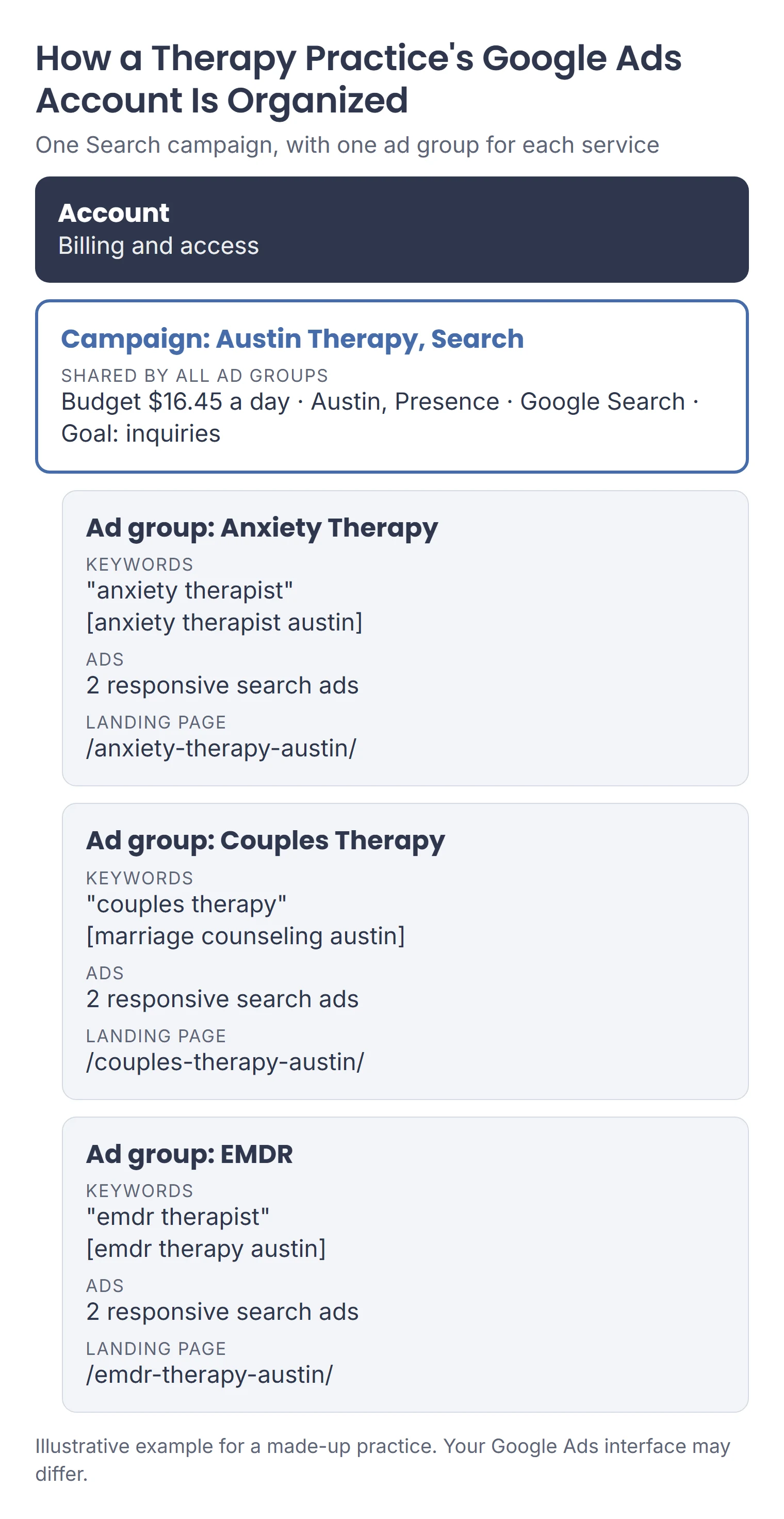
Google Ads has three levels: the account (billing), campaigns (budget and settings) and ad groups (keywords and ads). For a small practice, one Search campaign with an ad group for each service is a good start:
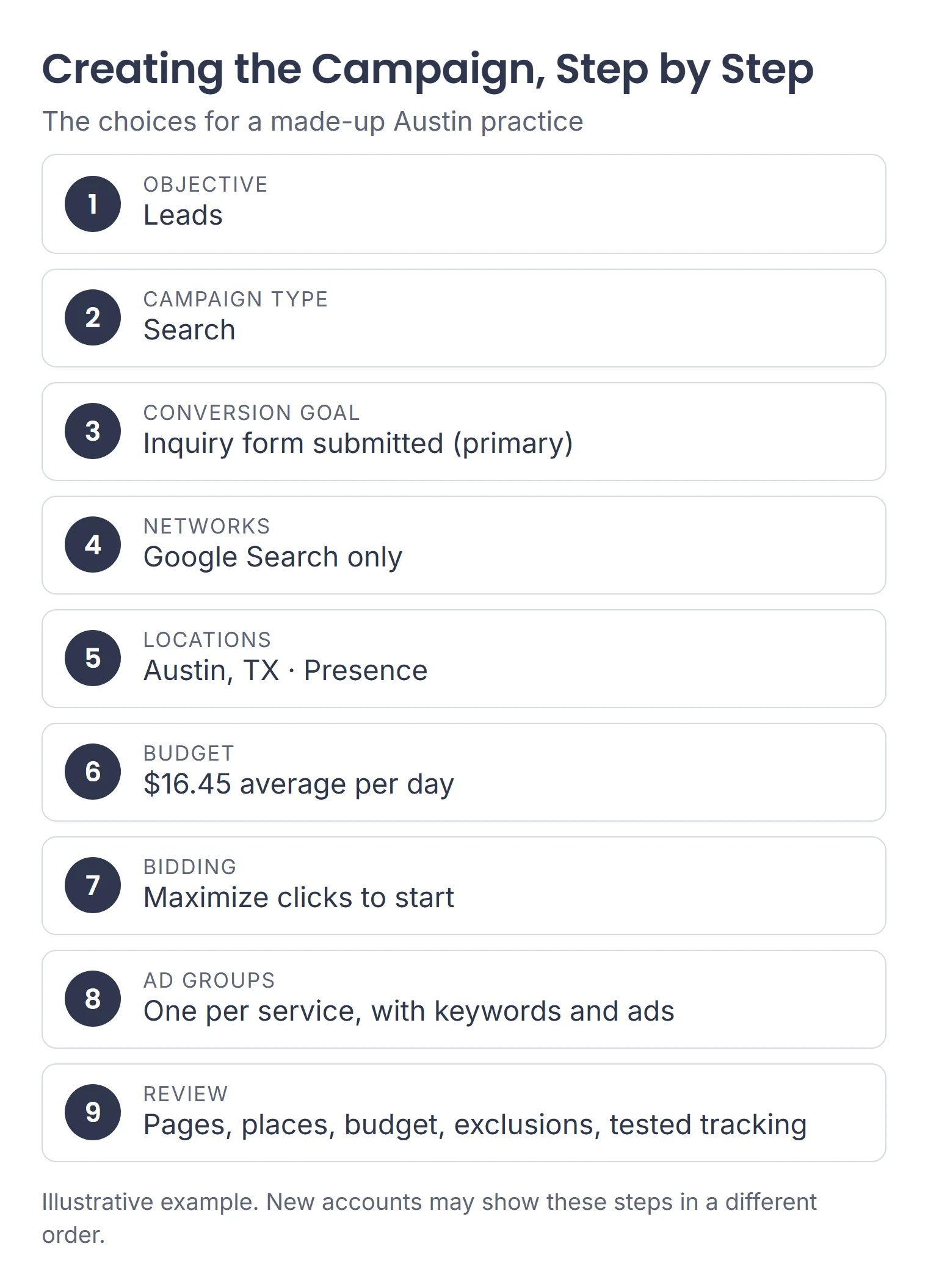
To create it: open Campaigns and click the plus button. Choose Leads, select Search and pick the inquiry conversion goal you prepared (see task 8). Name the campaign and work through the settings below. Then add each service’s ad group, keywords and ads. Before you publish, review your landing pages, locations, budget, negative keywords and tested conversion actions. New accounts may show these steps in a different order.
Google also offers Smart campaigns, which are simpler and more automated. A standard Search campaign gives you more control over keywords, locations and negative keywords. Even when you skip goal guidance, Google requires at least one conversion goal, so plan your tracking first (see task 8).
Key settings:
| Setting | A sensible start | Why |
|---|---|---|
| Networks | Google Search only | Keeps your test focused. Search partners and Display can be tested later |
| Locations | The areas you actually serve | Choose “Presence”: people in or regularly in your area. The default also includes people only “interested” in it |
| Ad schedule | When you can answer calls, if calls matter most | Schedules use your account’s time zone |
| Bidding | Maximize clicks at first, or Maximize conversions once tracking works | Clicks strategies don’t aim for inquiries. Conversion strategies need working conversion tracking. Target CPA aims for an average cost per conversion; it doesn’t cap each inquiry’s cost |
| Budget | The amount for one full month, divided by 30.4. For $500 a month, that’s about $16.45 a day | Keep this separate from your total test allowance, and recheck limits when you change the budget |
Google’s location targeting is “best effort”, so check where your clicks and inquiries really come from. For telehealth across a state, our online therapy marketing guide covers location choices.
The campaign above uses one shared budget for all three services. Set up one campaign this way before you add more.
5. Keywords and Match Types
Keywords are the searches you want your ads to show for. Google offers three match types:
| Match type | How you write it | What it matches |
|---|---|---|
| Broad | anxiety therapist | Related searches, the widest reach. This is Google’s default |
| Phrase | “anxiety therapist” | Searches that include the meaning of your keyword |
| Exact | [anxiety therapist] | Searches with the same meaning or intent |
Google recommends broad match with Smart Bidding. For this walkthrough, start with phrase and exact match to keep the first keyword set focused, then consider broad match once conversion tracking works. Either way, keep each ad group’s keywords tightly about one service, and only bid on services, insurers and places you truly offer.
Write 5 to 15 focused keywords for each ad group to start.
6. Negative Keywords
Negative keywords block searches that contain the words or phrases you choose. Pick the match type carefully, and check that it won’t remove searches you want:
- Negative broad (jobs): blocks searches that contain all its words, in any order.
- Negative phrase (“physical therapy”): blocks searches that contain those words in that order.
- Negative exact ([free therapy]): blocks only that exact search, with no extra words.
Add negatives to the whole campaign when they apply to every service, or to one ad group when they don’t. Build them from your own services, not from a long copied list:
| Negative keyword | Match type | Blocks searches like | Check first |
|---|---|---|---|
| jobs | Broad | therapist jobs austin | Usually fits a client campaign |
| massage | Broad | massage therapy near me | Only if you don’t offer massage |
| “physical therapy” | Phrase | physical therapy near me | Doesn’t block “therapy for physical abuse” |
| degree | Broad | therapy degree online | Usually fits a client campaign |
| free | Broad | free therapy near me | Only if you have no free option. It also blocks “free consultation” searches |
Negative keywords don’t expand to synonyms, so add related words separately, such as “job”, “jobs” and “careers”. Google handles capital letters and misspellings for you.
Add only the exclusions that fit your practice, then add more from your search terms report (task 9).
7. Your Ads
Google uses responsive search ads. You write 3 to 15 headlines of up to 30 characters each and 2 to 4 descriptions of up to 90 characters. Google mixes them, and not every line shows every time, so each headline must make sense on its own.
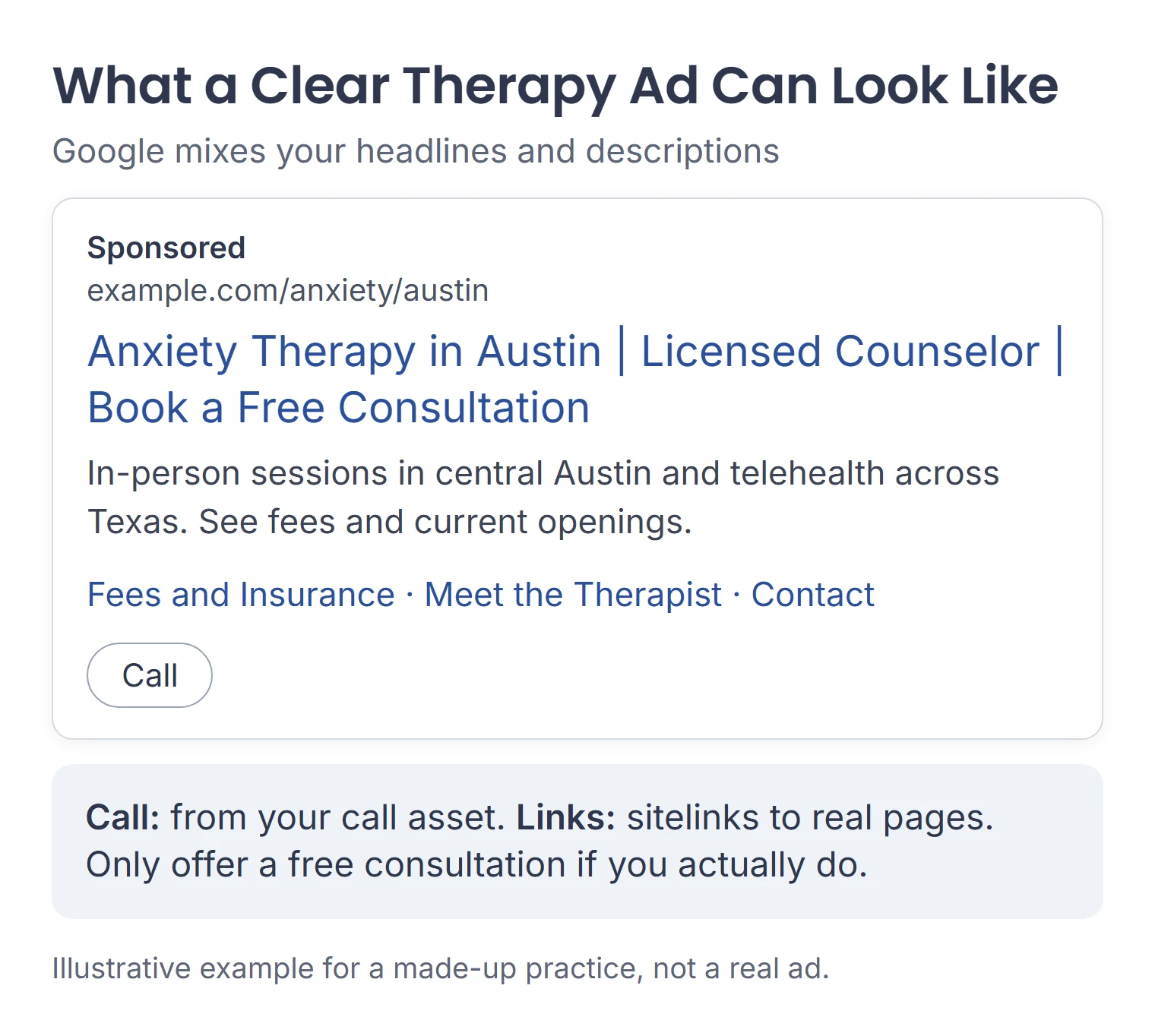
Good therapy ads are:
- Specific: “Anxiety Therapy in Austin” beats “Feel Better Today”.
- Accurate: your real fees, insurance, credentials and availability.
- Calm: no shaming, fear or promises of results.
- Clean: Google’s editorial rules don’t allow phone numbers in ad text, gimmicky capitals or odd punctuation. Use a call asset for your phone number instead.
Add sitelinks to real pages, such as fees, your bio and contact. Write two ads for each ad group so Google can compare them.
Step 3: Measure and Improve
Track what each click leads to, then trim what doesn’t work.
8. Conversion Tracking
A conversion is an action you choose to count, such as a submitted contact form or a call from your ad. Set up only the actions that matter:
- Form inquiries: count a successful form submission, not a click on the submit button or a page view.
- Calls from ads: after privacy review, turn on call reporting and choose the call conversion action. Check whether it counts calls by length, by recorded-call analysis or by an estimate. A click on a call button doesn’t prove someone actually inquired. For a simple setup, count calls over a set length with call recording off.
- Calls from your website: counted with the Google tag and a Google forwarding number.
To create a conversion action: go to Goals, then Summary, and create a conversion action. Choose the website or phone action, and follow Google’s conversion setup instructions. Set your real inquiry as the primary action used for bidding, and keep weaker signals secondary. Then test it with made-up details and confirm one inquiry is counted once.
Keep client details out of it. Don’t send names, diagnoses, form answers or appointment details to Google. Google’s customer data policies don’t allow conversions related to sensitive health categories to be used for enhanced conversions, so don’t turn that feature on for therapy inquiries. HHS guidance notes a June 2024 court ruling vacated part of its online tracking guidance, but HIPAA can still apply when tracking shares protected health information, for example from forms. Before you turn measurement on, have the person responsible for privacy review what your forms, page addresses, tags and call features (including recording) send. If you can’t find an acceptable setup, get help before turning it on.
A conversion isn’t a client. Count suitable inquiries and first sessions in your own records.
9. Regular Reviews
Check search terms and spending weekly at first. Make a fuller monthly review of inquiry quality and first sessions:
- Search terms report: see the real searches that triggered your ads. Add negative keywords for any that don’t fit. Google doesn’t show every low-volume search.
- Ads: keep the stronger ad and test a new one against it.
- Budget and bids: move money toward the services that bring suitable inquiries.
Allow inquiries time to become sessions before judging a small sample. Pause or reduce spend if you reach your test limit, can’t take more clients or find a tracking problem.
Google Ads for Therapists: What to Check
When results look wrong, start from what you see:
| What you see | Look at | First check |
|---|---|---|
| Spending fast, few inquiries | Search terms report | Are you paying for jobs, free or out-of-area searches? |
| No impressions at all | Ad status and policy | Is the ad disapproved, or are keywords too narrow? |
| Clicks but no inquiries | Landing page | Does it match the ad and show fees, location and how to book? |
| Inquiries you can’t help | Keywords and ads | Do they promise services, insurers or places you don’t cover? |
| An ad was disapproved | The policy Google names | Does it shame, cause fear, or break editorial rules? |
| Conversions look too high | Conversion actions | Are you counting page views or clicks on a phone number as inquiries? |
Want a Second Opinion on Your Google Ads?
If it would help to talk it through, we’re happy to look at your campaign or plan and suggest where we would start. You can also see how we work on our Google Ads management for therapists page.
Google Ads for Therapists: Common Questions
How much do Google Ads cost for therapists?
It depends on your city, services and competition. Ahrefs’ October 2026 US estimates ranged from $1.50 to $12.00 per click for the therapy searches we checked. You set an average daily budget. Most campaigns can spend up to twice that on one day, and an unchanged full month is capped at about 30.4 times the daily amount.
Do Google Ads work for therapists?
They can. Results depend on the searches you reach, your landing pages and how you handle inquiries. Broad match can work with Smart Bidding, but you still need to review search terms and suitable inquiries. Set a spending limit, and judge the cost of first sessions, allowing for booking delays.
Do therapists need certification to run Google Ads?
Not for ordinary counseling, in the Google policies we checked in October 2026. US ads for drug and alcohol recovery services need LegitScript and Google certification. Online prescribing, dispensing or selling prescription drugs has separate rules. Check the healthcare policy for your exact services before you launch.
Can therapists use remarketing ads?
No, not for mental health services. Google’s health in personalized advertising policy doesn’t allow advertiser-curated audiences, such as remarketing lists or uploaded client lists, for ads about mental health counseling. You can still run Search ads that respond to what people search for, within Google’s other policies.
Should I use a Smart campaign or a standard Search campaign?
Smart campaigns are simpler and more automated, which suits some busy practices. A standard Search campaign gives you more control over keywords, negative keywords and locations, which matters when clicks are expensive. For the setup in this guide, choose a standard Search campaign so you can review these settings yourself.
Sources
Checked October 27, 2026. Cost and volume figures are Ahrefs US estimates retrieved October 27, 2026. This page is general information, not legal or compliance advice.
- Google Ads: Create a Search campaign and account organization
- Google Ads: Smart campaigns
- Google Ads: Keyword match types, negative keywords and search terms report
- Google Ads: Responsive search ads, call assets and sitelinks
- Google Ads: Location targeting and advanced location options
- Google Ads: Choose a bid strategy and spending limits
- Google Ads: Conversion measurement and customer data policies
- Google Ads: Healthcare and medicines and health in personalized advertising
- Google Ads: Imposing negativity and editorial policy
- HHS: Online tracking technologies