
To market an online therapy practice, start with the states where each clinician can see clients. Make it clear who you help and how to book, then build directory profiles, search visibility and referrals around that offer. Use Google Ads when you have openings, and track suitable inquiries and first sessions by channel and state.
Online counseling marketing at a glance: six parts
| Part | Priority for an online practice | First thing to check |
|---|---|---|
| Directory profiles | Appear in relevant online-session searches | State coverage and telehealth settings |
| Your website | Explain who you help and how video sessions work | States, fees and booking steps |
| SEO | Connect services with places you can serve | Useful specialty and state pages |
| Google Ads | Reach people in selected service areas | Location settings and clinician openings |
| Referrals | Help professionals find a suitable online provider | Specialty, states and appointment times |
| Inquiry handling | Match each person to an available clinician | Session location, payment and time zone |
Our guide to getting more therapy clients covers the general setup of these channels. Here, the focus is on the decisions that change when appointments happen online.
1. Start with where you can serve
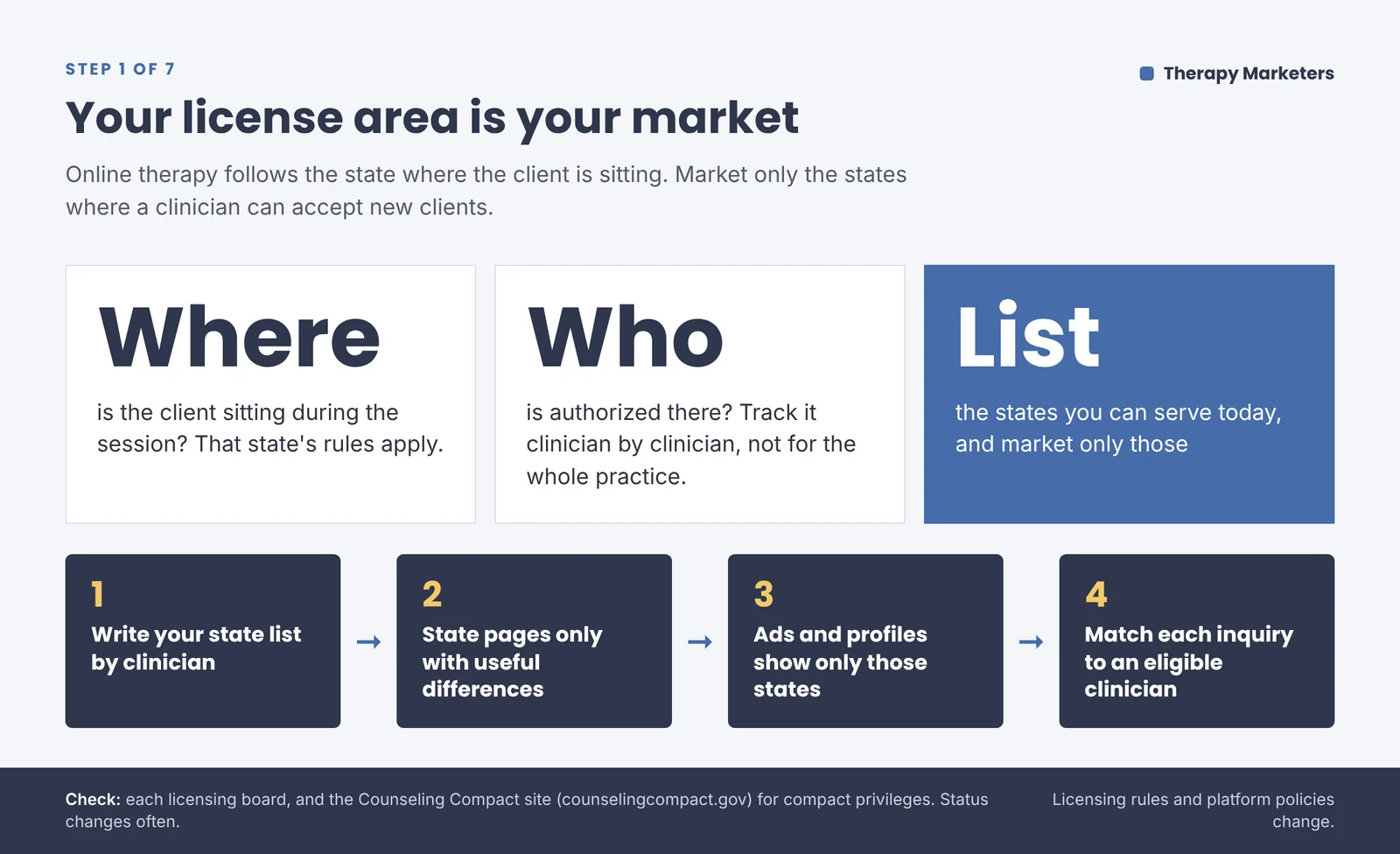
List the states where each clinician is currently authorized to provide online therapy. A client’s location during the session matters; their home address alone isn’t enough. Confirm requirements with the relevant licensing boards, including those where the clinician practices.
For professional counselors, the Counseling Compact offers a route to practice in participating states through approved privileges. Check whether you qualify, which states are issuing privileges, and whether your own privilege has been issued before advertising availability.
Keep this information by clinician, alongside specialties and openings. A group practice serving three states shouldn’t imply that every therapist can see clients in all three.
Outcome: your marketing names the states and clinicians available to new clients.
2. Make your website say “online” in the first screen
Put your online offer, states served and booking option where visitors can see them without scrolling. Add whom you help: “Online therapy for adults dealing with panic attacks in Texas” gives someone a specific service and location.
Show the clinician they’ll meet, explain their approach in everyday language, and make fees and insurance easy to find. Describe what joining a video session involves, including the software they’ll use and how to find a private space.
Test booking on a phone. Can visitors find an eligible clinician, see the appointment’s time zone and understand what happens after submitting the form? Keep clinical details for your secure intake process.
Outcome: visitors can assess fit and request an online appointment without guessing how it works.
3. Get your directory profiles right
Check your profile as a prospective client would, using online-session and location filters where available. Confirm how the directory handles your authorized states; don’t assume selecting “online” makes you visible across all of them.
Keep online availability, specialties and payment details current. Link to the relevant online service or clinician page.
Be careful with reviews and testimonials. The ACA’s testimonial rule prohibits counselors from soliciting them from current or former clients and people vulnerable to undue influence. Check your professional code and board before requesting or reusing a testimonial. Avoid automatic post-session review requests, and don’t confirm a reviewer’s client status.
Outcome: your profile clearly describes your online offer and supports trust without pressuring clients for endorsements.
4. Build SEO around issues and states
Search engine optimization, or SEO, helps search engines find and understand your pages. Start with the online services you want more inquiries for, such as anxiety therapy. Explain whom the service suits, what sessions involve and where it’s available.
Create a separate state page when it offers useful information for that state’s clients. That might include eligible clinicians, applicable insurance arrangements and actual appointment availability. Swapping state names in otherwise identical copy adds little for the reader.
Use articles to answer questions people have before contacting an online therapist. Explain what a first video session involves or how you handle privacy during remote appointments. Link each article to the relevant service so readers can explore working with you.
If you’d like help planning those pages, our SEO services for therapists cover keyword research, service content and website improvements.
Outcome: visitors can find relevant information and a service available where they’ll attend sessions.
5. Use Google Ads for states and capacity you can handle
Start with an online service that has openings, a matching page and a budget you can afford to test. State that sessions are online in the ad and on the page.
Review Google’s location options. For Search campaigns, “Presence” targets people likely to be in or regularly in your chosen locations. The broader default also includes people interested in those places. Neither option verifies where someone will attend therapy.
Review location reports and unsuitable inquiries. If one state’s clinicians fill up, adjust that targeting and the availability shown on your page.
Check current advertising policies and your tracking setup before launch. Keep clinical information and inquiry details out of advertising tools.
Outcome: you can test a defined service area and adjust spending to match clinician capacity.
6. Build referrals from other professionals
An online practice can develop referral relationships across the states it serves. Look for clinicians or organizations whose clients need your specialty, including areas where clients struggle to find that help in person.
Give referrers a short, current description of your online service. State the client’s required location, eligible ages, payment options and appointment times with the time zone. For groups, identify who has openings.
Use a secure route for client information, and tell partners when availability changes. Keep clinical suitability part of the referral decision.
Outcome: partners can recognize an appropriate online referral and contact the right person.
7. Handle inquiries and capacity
Assign each inquiry to someone who can respond within your stated response window. Before offering a slot, confirm the person’s planned session location, payment arrangements and preferred times.
For group practices, match those details to the clinician’s authorization and availability. Check the booking confirmation shows the time zone and explains how the client receives the video link. Give them a contact route if they have trouble joining.
If you’re full, explain the wait and ask permission before adding someone to a waitlist. Avoid implying that an available appointment in one state means the whole practice has openings.
Outcome: each suitable inquiry has an owner, an eligible clinician and a clear next step.
Common mistakes to avoid
- Advertising nationwide when your clinicians can serve only certain states.
- Sending online inquiries into a booking process designed for office visits.
- Publishing state pages that contain no useful differences.
- Increasing ad spending before checking why suitable inquiries aren’t booking.
Track what each channel sends you
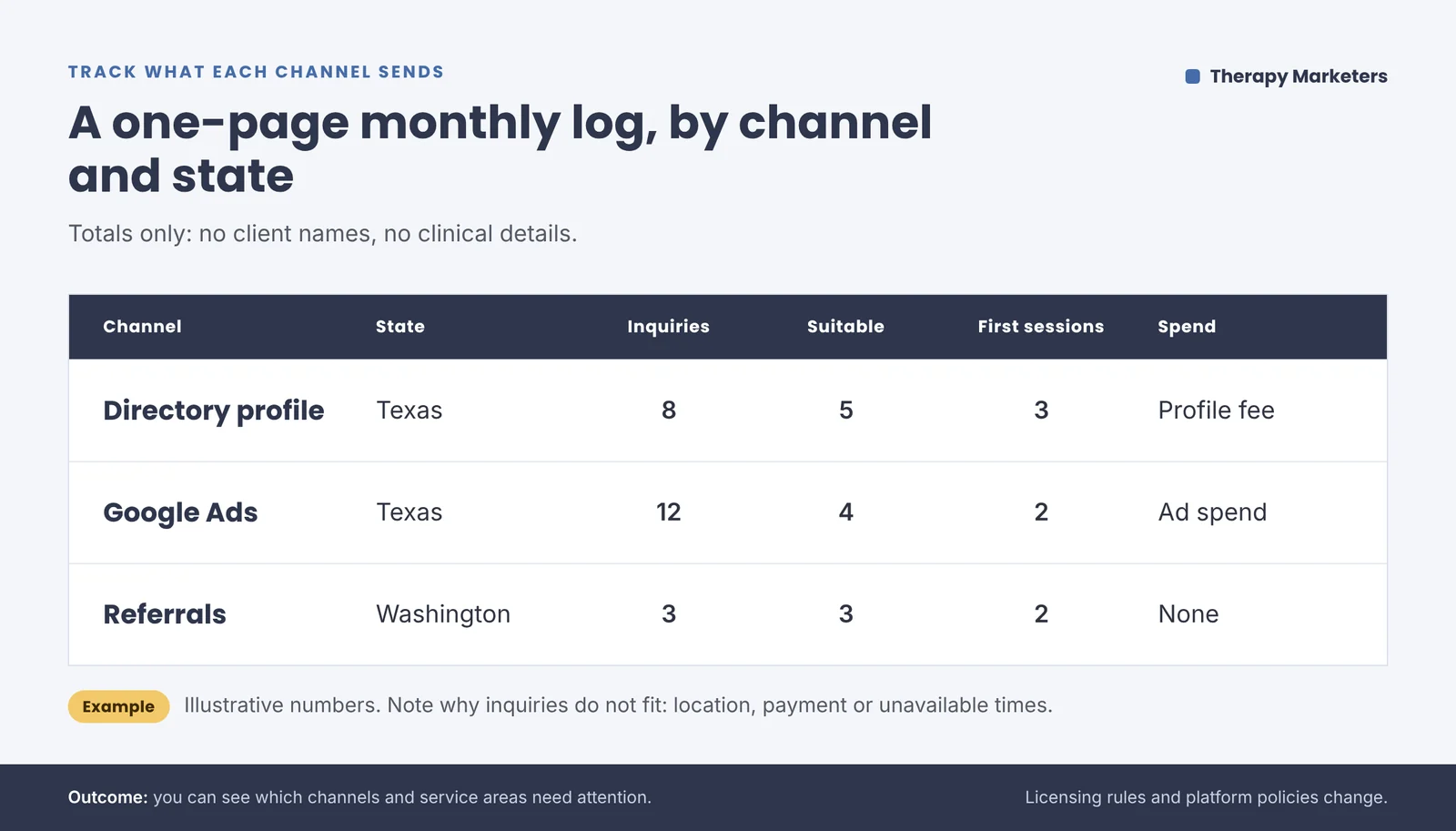
Keep monthly totals by channel and state: inquiries, suitable inquiries, first sessions attended and spending. Keep client names and clinical details out of the marketing summary.
Note why inquiries don’t fit, such as location, payment or unavailable appointment times. If a directory sends many people from states you can’t serve, check its settings and your wording before paying for more exposure.
Allow inquiries time to become appointments before judging results. Small totals can suggest something to investigate without proving that a channel works or fails.
If you’d like help choosing what to improve, request a free call about your online practice’s marketing.
Outcome: you can see which channels and service areas need attention.
Quick answers
Do I need a niche?
A niche is a particular client group or concern you focus on. You don’t need to narrow your entire practice, but your marketing should describe a clear fit. Promote specialties that match your training, experience and available appointments.
Do I need social media?
It’s optional. Use one platform if you can maintain it and have useful educational material to share. Make your service states clear, and direct appointment inquiries to your contact process. Followers outside those states don’t expand where you can practice.
Should I offer a free consultation?
You can, if it fits your workflow. Explain its length, whether it’s by phone or video, and its purpose. A brief conversation can cover practical fit and the next step; avoid presenting it as a free therapy session.
Can I use Google Business Profile for an online-only practice?
No. Google lists online-only businesses as ineligible. If you also meet clients in person, assess that setup against the eligibility rules. A business address alone doesn’t establish eligibility.
How much should I spend?
Start with a test budget you can afford without depending on immediate bookings. Include outside help and staff time. Increase spending when suitable inquiries become attended sessions and the relevant clinicians have capacity.
How long will it take to get clients?
There’s no reliable deadline. Ads and directory profiles can create visibility once live, but inquiries and bookings aren’t guaranteed. Review search progress and actual inquiry patterns over time instead of relying on a fixed industry timeline.
General information, not legal or compliance advice. Confirm current requirements with your licensing board, professional code and relevant platforms.